


Helper Helper
4.423.00 Reviews
App Specs
- Version
- 13.4
- Updated On
- License
- Free
- Downloads
- 50,000+
- Developer
- Helper Helper
- Categories
- Events
- Platform
- Android
Screenshots
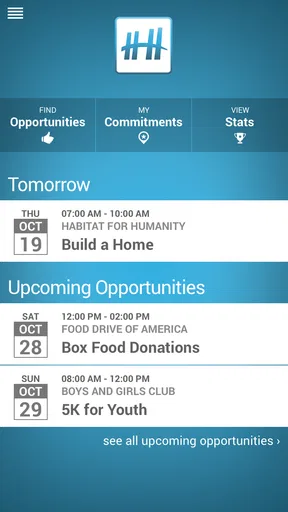
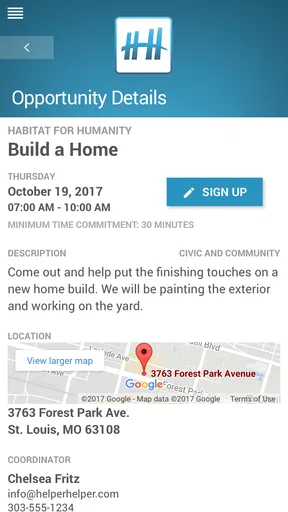
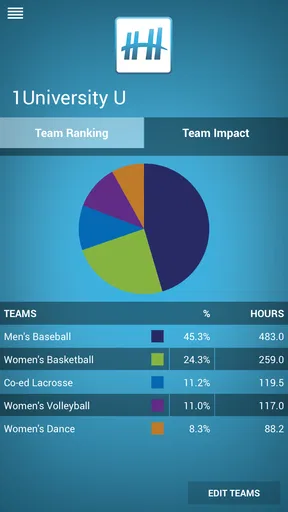
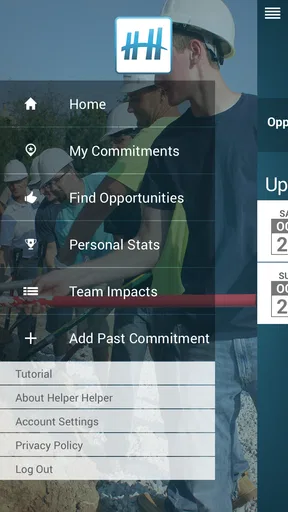
 Analysis by AppCompare
I’d treat Helper Helper as a practical coordination tool for volunteering, rather than a general-purpose event finder. Its value depends on whether the school, community group, or other organization you volunteer with uses it. If your group is set up there, it can give you a shared place to find service events and keep track of participation. If you volunteer independently, or your organization relies on another system, the app may have little to offer you.
Where volunteers can get stuck
The first hurdle is usually not the event list; it is getting connected to the right organization. Before spending time exploring, check that your school or volunteer group uses the app and that you know which organization to join. A misspelled name or choosing a similarly named group can leave you looking at the wrong opportunities, or none at all.
That organization-first approach is useful when a coordinator wants members to see the same events, but it can feel restrictive if you expect an open directory of every volunteer opportunity nearby. I would not assume that every local nonprofit or one-off event appears in the app. It is most useful when the group you already belong to has made it part of its routine.
Another point to check early is what your coordinator expects you to do after an event. Signing up, attending, and recording service time are separate steps in many volunteer workflows. A participant who assumes that an event sign-up automatically confirms attendance or records hours could end up with an incomplete record. I’d follow the organization’s instructions the first time, then use that process consistently.
Setup checks that save time
Helper Helper is a free events app from Helper Helper. It has a 4.4 average from around 250 ratings, and more than 50,000 installs. It is rated for everyone, so it can suit student volunteers as well as adults coordinating community work. The app dates back to 2014, and version 13.3 supports Android 5.0 and later.
For a smooth start, confirm that you can access the account and organization your group expects you to use before an event day. If a coordinator shares instructions through email or a school portal, keep those details handy while joining. That simple preparation can distinguish an account or group-selection issue from a problem with a particular event.
It is also worth checking the event details directly rather than relying on a calendar entry alone. Make sure the date, location, and service activity match what your organizer has announced. If anything differs, ask the coordinator which source is current. This is a useful habit with any shared event system: the app helps organize information, but the group still needs to keep that information accurate.
Worth Reading Before You Choose

EA SPORTS FC Mobile 26 Is a Bigger Football Game, but It Takes Time

Flipboard Shows What News Apps Must Do Beyond the Feed

Switching to Android Auto Means Rethinking Your Driving Routine

Google Calendar Makes a Crowded Week Easier to Manage

Ludo King Makes the Most of the Minutes Between Plans

Baby Panda World Brings Quick Play to Modern Phones, but Its Game Library Feels Busy
Using Helper Helper for real volunteer routines
The first thing you’ll notice is the clean, user-friendly interface. Setting up an account is presented as a quick process, but the useful next step is joining your school or organization. That connection is what makes group-specific events available and gives the app a clear purpose: it can replace scattered announcements with a shared place to check what your group is doing.
For example, imagine you’re a student trying to fit a weekend service activity around classes and a part-time job. You can check the group’s upcoming events, choose one that fits, and keep the details in view instead of searching through old messages. If plans change, check the event information again before leaving; a calendar is helpful for planning, but it should not be treated as a substitute for current instructions from the organizer.
Finding an event that fits
The event browsing and calendar tools are most helpful when you have a practical constraint: a certain day, a location you can reach, or a kind of service you want to do. Narrowing your choices around those needs is more useful than signing up simply because an event looks interesting. If you are coordinating with a friend or classmate, seeing who else from your organization is attending can also help you decide whether the timing and group setting suit you.
One small workflow tip is to check opportunities at the start of the week, then revisit the event details closer to the day. That gives you time to plan transport and avoid confusing an old announcement with the current schedule. Reminders can help you remember a commitment, but they cannot resolve a last-minute change; for that, the organizer’s latest message matters more.
Compared with a general calendar, this app is more directly tied to a volunteer group’s activities. A calendar can hold a date, but it does not by itself connect that date to a shared service opportunity or the people attending. Compared with email and newsletters, a dedicated event list can be easier to scan, though it only helps if coordinators keep it up to date and participants remember to check it.
Keeping a reliable service record
Recording hours after an event can be easier than reconstructing them at the end of a semester. I’d make a habit of entering the time soon after finishing, while the duration and event are still fresh. If your school or employer needs proof, find out what record or report it accepts before relying on an in-app total. A running record is useful for your own tracking, but the organization’s requirements determine what counts as official documentation.
There is a practical trade-off here: a shared system can reduce personal spreadsheet work, but it depends on volunteers entering information consistently and on coordinators using the records as intended. If an event does not appear in your history, first check whether you completed the expected logging step and whether the event was associated with your group. Then ask the organizer how to correct the record rather than entering a guess that might make your total inaccurate.
Reports can be helpful when you need to summarize participation, but I would review the dates and entries before sharing one. A quick check can catch a missed event or a mistaken duration early, when it is easier to resolve. For students completing a service requirement, this is especially useful: keep the app record organized, but follow the school’s process for submission as well.
When the app is not the cause
If you cannot see an opportunity, start by checking that you joined the intended organization and that the event is meant for that group. If the calendar looks outdated or the location seems wrong, compare it with the organizer’s latest announcement. These checks are more productive than repeatedly refreshing the same screen when the underlying issue may be an incomplete account setup or an event detail that needs correction.
When a sign-up or hour entry does not behave as expected, note what you were trying to do and contact the coordinator with the event name and the relevant detail. That gives them something concrete to check. For a general access problem, confirm that the app is current and that your device meets the Android minimum of 5.0 if you use Android. On iOS, use the version supported by your device and check for an available app update through the usual store process.
Some volunteers will be better served by a different arrangement. If you choose projects across many unrelated organizations, a broad local volunteering directory may be easier for discovering options. If your group already coordinates everything through a calendar or another platform, adding a second place to check could create more work than it saves. The best fit is a group that actively uses this app and expects members to manage event participation there.
A useful fit for organized group service
The social element can make volunteering feel less solitary: seeing familiar people signed up may encourage you to follow through or try an event with friends. I’d use that as a planning aid, not as the main reason to choose an activity. Pick events that match your schedule and interests first; the group view is a bonus when it helps you feel comfortable joining.
Helper Helper is a sensible choice for students, employees, and community members whose organizations use it to coordinate service events and track participation. Its strongest appeal is the combination of group-specific opportunities, calendar planning, and hour records in one place. The main limitation is just as clear: it is not a universal solution for finding every cause or replacing a coordinator’s instructions.
If your organization already relies on it, I’d give it a try and build a simple routine: check upcoming events, verify the details before attending, and log your time promptly afterward. If your group does not use it, or you need to discover opportunities across a wide area, another approach will likely be more practical. For the right volunteer community, though, this free app can make the administrative side of showing up easier to manage.
Hey there! So, I recently got my hands on an app called Helper Helper, and let me tell you, it's a game changer for anyone involved in volunteer work or community service. Whether you're a student, a volunteer coordinator, or just someone who loves giving back, this app aims to streamline the entire process. Let's dive into what makes this app tick and why you might want to give it a shot.
The first thing you'll notice when you open the app is its clean and user-friendly interface. Setting up an account is a breeze—just a few taps, and you're ready to go. The app is designed to help you find, manage, and track volunteer opportunities efficiently.
Once you're in, the app allows you to join your organization or school, which then lets you access specific events and opportunities tailored to your group. It's a brilliant way to keep everyone in the loop without the usual chaos of emails and newsletters.
Finding Opportunities
One of the standout features is its ability to connect you to various volunteer opportunities. You can browse through a list of events, filter by date, location, or type of service, and even see who else from your organization is attending. It's like having a volunteer fair in your pocket!
If you're someone who likes to plan ahead, the calendar feature is your best friend. You can see upcoming events, sign up, and even set reminders so you never miss a chance to make a difference.
Tracking and Logging Hours
Gone are the days of manually logging your volunteer hours on paper or spreadsheets. With the app, you can track your hours with just a few taps. Once you've completed an event, you can log your time instantly, and the app keeps a running total for you.
What's really cool is that the app can generate reports for you. This is especially handy if you need to provide proof of service hours for school or work. It's all about making things easier and more transparent.
Why You'll Love It
Now, let’s talk about why you might fall in love with this app. For starters, it's incredibly intuitive. The developers clearly understand the needs of volunteers and coordinators alike. The app helps reduce the administrative burden, so you can focus more on what really matters—making a difference.
The social aspect of the app is another highlight. You can see what your friends or colleagues are up to, which can be a great motivator. Plus, there’s a sense of community when you see everyone coming together for a cause.
Wrapping It Up
In a world where time is of the essence, the app stands out as a must-have tool for anyone involved in volunteer work. It's practical, easy to use, and genuinely enhances the volunteering experience. Whether you're logging hours or just discovering new ways to give back, this app has got you covered.
If you’re ready to simplify your volunteer journey, go ahead and give it a download. It's available on both Android and iOS, and trust me, once you try it, you'll wonder how you ever managed without it. Happy volunteering!
Pros
- User-friendly interface enhances navigation.
- Efficient task organization boosts productivity.
- Reminders ensure timely task completion.
- Customizable settings cater to personal needs.
- Supports collaboration for team projects.
Cons
- Limited offline functionality reduces accessibility.
- Occasional sync issues may cause delays.
- Requires frequent updates for smooth performance.
- Lacks integration with some popular apps.
- Advanced features locked behind paywall.
FAQs for Helper Helper
What is Helper Helper and how does it work?
Helper Helper is a volunteer management app designed to streamline the process of organizing and tracking volunteer activities. It allows users to search for opportunities, track their hours, and receive notifications about upcoming events. The app is user-friendly, providing a seamless experience for both volunteers and organizers.
Is Helper Helper available for both Android and iOS devices?
Yes, Helper Helper is available for download on both Android and iOS platforms. Users can find the app on the Google Play Store and Apple App Store, ensuring compatibility with a wide range of devices, making it accessible to a broad audience of volunteers and organizations.
How secure is my data on Helper Helper?
Helper Helper prioritizes user privacy and data security. The app employs robust encryption methods to protect personal information and volunteer data. Regular updates and security audits ensure that the app meets industry standards, providing peace of mind to users concerned about data security.
Can organizations customize volunteer opportunities on Helper Helper?
Yes, organizations can customize volunteer opportunities to suit their needs. They can create specific events, set requirements, and manage volunteers effectively. This customization helps organizations maintain control over their volunteer programs and tailor opportunities to attract the right participants.
Is there a cost associated with using Helper Helper?
While Helper Helper offers a free version, it also provides premium features that organizations can purchase. These premium options offer enhanced functionalities, such as advanced reporting and analytics, which can be particularly beneficial for larger organizations managing extensive volunteer programs.


